Implement app-ads.txt
What is app-ads.txt?
app-ads.txt is a file hosted on the root domain of a publisher's website that links to the Google Play Store or Apple App Store. Publishers use this file to prove their ownership of an app that originates an ad request to Advertisers.
When an app makes an ad request, an Advertiser can check the app marketplace page for the app, find the corresponding app-ads.txt file, and verify that the publisher ID included in the ad request matches the corresponding ID in the app-ads.txt file. This prevents a malicious actor from faking ad requests from an app, because the publisher ID in their ad request will not match the publisher ID included in the app-ads.txt file.
You can read more about app-ads.txt here: https://iabtechlab.com/ads-txt
How do I implement app-ads.txt?
Step 1: Define your website on your Google Play Store and Apple App Store app pages
- For Google Play: Add the website URL in the contact information of your app listing:
- Sign in to your Play Console.
- Select an app.
- On the left menu, click Store presence > Store listing.
- Scroll to Contact Details.
- Add your developer website URL.
- For Apple App Store: Add your developer website in the marketing URL field of your store listing.
Step 2: Create your app-ads.txt file
View an example of app-ads.txt file:
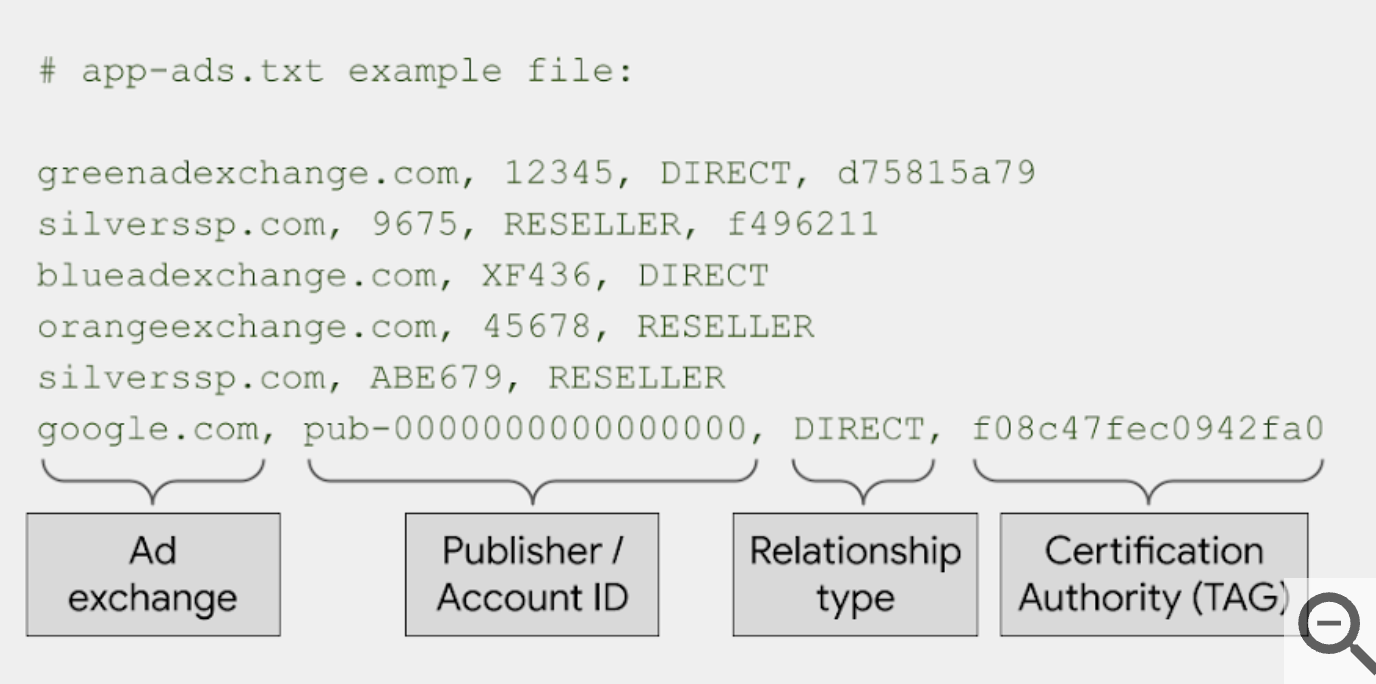
Step 3: Publish your app-ads.txt file on your developer website
Add your app-ads.txt file to the root domain of the website that is defined in your app marketplace pages. For example, if the website from step 1 is:
https://www.mywebsite.com/help/contact”, add this text file here:
https://www.mywebsite.com/app-ads.txt”.
PremiumAds app-ads.txt
Please get the full list app-ads txt in our dashboard.
premiumads.net, *PUBLISHER ID*, DIRECT
google.com, pub-3619045887187031, RESELLER, f08c47fec0942fa0