Get Started
Prerequisites
- Use Xcode 16 or higher
- Target iOS 15.0 or higher
The latest Google Mobile Ads SDK for iOS is version 12.13.0.
Import the Mobile Ads SDK
CocoaPods (preferred)
The simplest way to import the SDK into an iOS project is to use CocoaPods. Open your project's Podfile and add this line to your app's target:
platform :ios, '15.0'

target 'YourApp' do
  use_frameworks!
  pod 'Google-Mobile-Ads-SDK', '~> 12.13'
end
Then from the command line run:
pod install --repo-update
If you're new to CocoaPods, see their official documentation for info on how to create and use Podfiles.
Swift Package Manager
The Mobile Ads SDK supports Swift Package Manager starting in version 9.0.0. Follow the steps below to import the Swift package.
- In Xcode, install the Google Mobile Ads Swift Package by navigating to File > Add Packages....
- In the prompt that appears, search for the Mobile Ads Swift Package GitHub repository:
https://github.com/googleads/swift-package-manager-google-mobile-ads.git
- Select the version of the Google Mobile Ads Swift Package you want to use. For new projects, we recommend using the Up to Next Major Version.
Once you're finished, Xcode will begin resolving your package dependencies and downloading them in the background. For more details on how to add package dependencies, see Apple's article.
Manual download
- Download and unzip the SDK framework directly, and import the following frameworks into your Xcode project:
- GoogleAppMeasurement.xcframework
- GoogleAppMeasurementIdentitySupport.xcframework
- GoogleMobileAds.xcframework
- GoogleUtilities.xcframework
- nanopb.xcframework
- PromisesObjC.xcframework
- UserMessagingPlatform.xcframework
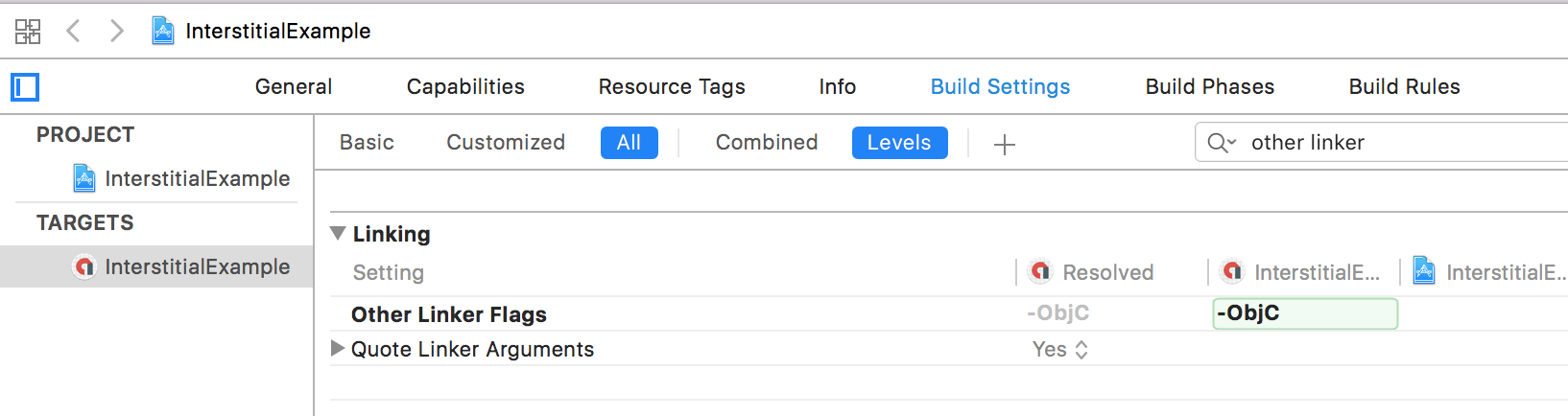
- Add the -ObjC linker flag to Other Linker Flags in your project's build settings:
Update your Info.plist
Update your app's Info.plist file to add two keys:
- A
GADApplicationIdentifierkey with a string value of your App ID (identified in the PremiumAds Publishers Dashboard). For testing you can use Google's sample App IDca-app-pub-3940256099942544~1458002511. - A
SKAdNetworkItemskey withSKAdNetworkIdentifiervalues for Google (cstr6suwn9.skadnetwork) and select additional buyers who have provided these values to Google.
SKAdNetworkItems list — please refer to the official Google Mobile Ads SDK iOS documentation for the full set of identifiers and copy it into your Info.plist.<key>GADApplicationIdentifier</key>
<string>ca-app-pub-3940256099942544~1458002511</string>
<key>SKAdNetworkItems</key>
<array>
<dict>
<key>SKAdNetworkIdentifier</key>
<string>cstr6suwn9.skadnetwork</string>
</dict>
<dict>
<key>SKAdNetworkIdentifier</key>
<string>4fzdc2evr5.skadnetwork</string>
</dict>
<dict>
<key>SKAdNetworkIdentifier</key>
<string>2fnua5tdw4.skadnetwork</string>
</dict>
<dict>
<key>SKAdNetworkIdentifier</key>
<string>ydx93a7ass.skadnetwork</string>
</dict>
<dict>
<key>SKAdNetworkIdentifier</key>
<string>p78axxw29g.skadnetwork</string>
</dict>
<dict>
<key>SKAdNetworkIdentifier</key>
<string>v72qych5uu.skadnetwork</string>
</dict>
<dict>
<key>SKAdNetworkIdentifier</key>
<string>ludvb6z3bs.skadnetwork</string>
</dict>
<dict>
<key>SKAdNetworkIdentifier</key>
<string>cp8zw746q7.skadnetwork</string>
</dict>
<dict>
<key>SKAdNetworkIdentifier</key>
<string>3sh42y64q3.skadnetwork</string>
</dict>
<dict>
<key>SKAdNetworkIdentifier</key>
<string>c6k4g5qg8m.skadnetwork</string>
</dict>
<dict>
<key>SKAdNetworkIdentifier</key>
<string>s39g8k73mm.skadnetwork</string>
</dict>
<dict>
<key>SKAdNetworkIdentifier</key>
<string>wg4vff78zm.skadnetwork</string>
</dict>
<dict>
<key>SKAdNetworkIdentifier</key>
<string>3qy4746246.skadnetwork</string>
</dict>
<dict>
<key>SKAdNetworkIdentifier</key>
<string>f38h382jlk.skadnetwork</string>
</dict>
<dict>
<key>SKAdNetworkIdentifier</key>
<string>hs6bdukanm.skadnetwork</string>
</dict>
<dict>
<key>SKAdNetworkIdentifier</key>
<string>mlmmfzh3r3.skadnetwork</string>
</dict>
<dict>
<key>SKAdNetworkIdentifier</key>
<string>v4nxqhlyqp.skadnetwork</string>
</dict>
<dict>
<key>SKAdNetworkIdentifier</key>
<string>wzmmz9fp6w.skadnetwork</string>
</dict>
<dict>
<key>SKAdNetworkIdentifier</key>
<string>su67r6k2v3.skadnetwork</string>
</dict>
<dict>
<key>SKAdNetworkIdentifier</key>
<string>yclnxrl5pm.skadnetwork</string>
</dict>
<dict>
<key>SKAdNetworkIdentifier</key>
<string>t38b2kh725.skadnetwork</string>
</dict>
<dict>
<key>SKAdNetworkIdentifier</key>
<string>7ug5zh24hu.skadnetwork</string>
</dict>
<dict>
<key>SKAdNetworkIdentifier</key>
<string>gta9lk7p23.skadnetwork</string>
</dict>
<dict>
<key>SKAdNetworkIdentifier</key>
<string>vutu7akeur.skadnetwork</string>
</dict>
<dict>
<key>SKAdNetworkIdentifier</key>
<string>y5ghdn5j9k.skadnetwork</string>
</dict>
<dict>
<key>SKAdNetworkIdentifier</key>
<string>v9wttpbfk9.skadnetwork</string>
</dict>
<dict>
<key>SKAdNetworkIdentifier</key>
<string>n38lu8286q.skadnetwork</string>
</dict>
<dict>
<key>SKAdNetworkIdentifier</key>
<string>47vhws6wlr.skadnetwork</string>
</dict>
<dict>
<key>SKAdNetworkIdentifier</key>
<string>kbd757ywx3.skadnetwork</string>
</dict>
<dict>
<key>SKAdNetworkIdentifier</key>
<string>9t245vhmpl.skadnetwork</string>
</dict>
<dict>
<key>SKAdNetworkIdentifier</key>
<string>a2p9lx4jpn.skadnetwork</string>
</dict>
<dict>
<key>SKAdNetworkIdentifier</key>
<string>22mmun2rn5.skadnetwork</string>
</dict>
<dict>
<key>SKAdNetworkIdentifier</key>
<string>44jx6755aq.skadnetwork</string>
</dict>
<dict>
<key>SKAdNetworkIdentifier</key>
<string>k674qkevps.skadnetwork</string>
</dict>
<dict>
<key>SKAdNetworkIdentifier</key>
<string>4468km3ulz.skadnetwork</string>
</dict>
<dict>
<key>SKAdNetworkIdentifier</key>
<string>2u9pt9hc89.skadnetwork</string>
</dict>
<dict>
<key>SKAdNetworkIdentifier</key>
<string>8s468mfl3y.skadnetwork</string>
</dict>
<dict>
<key>SKAdNetworkIdentifier</key>
<string>klf5c3l5u5.skadnetwork</string>
</dict>
<dict>
<key>SKAdNetworkIdentifier</key>
<string>ppxm28t8ap.skadnetwork</string>
</dict>
<dict>
<key>SKAdNetworkIdentifier</key>
<string>kbmxgpxpgc.skadnetwork</string>
</dict>
<dict>
<key>SKAdNetworkIdentifier</key>
<string>uw77j35x4d.skadnetwork</string>
</dict>
<dict>
<key>SKAdNetworkIdentifier</key>
<string>578prtvx9j.skadnetwork</string>
</dict>
<dict>
<key>SKAdNetworkIdentifier</key>
<string>4dzt52r2t5.skadnetwork</string>
</dict>
<dict>
<key>SKAdNetworkIdentifier</key>
<string>tl55sbb4fm.skadnetwork</string>
</dict>
<dict>
<key>SKAdNetworkIdentifier</key>
<string>c3frkrj4fj.skadnetwork</string>
</dict>
<dict>
<key>SKAdNetworkIdentifier</key>
<string>e5fvkxwrpn.skadnetwork</string>
</dict>
<dict>
<key>SKAdNetworkIdentifier</key>
<string>8c4e2ghe7u.skadnetwork</string>
</dict>
<dict>
<key>SKAdNetworkIdentifier</key>
<string>3rd42ekr43.skadnetwork</string>
</dict>
<dict>
<key>SKAdNetworkIdentifier</key>
<string>97r2b46745.skadnetwork</string>
</dict>
<dict>
<key>SKAdNetworkIdentifier</key>
<string>3qcr597p9d.skadnetwork</string>
</dict>
</array>
For optimal initialization performance, it is important to associate your yield groups with the specific apps they are used in. Yield group configurations targeting iOS and unassociated with any specific app will be sent to all iOS apps in your account, potentially lengthening the time required to initialize.
Initialize the Mobile Ads SDK
Before loading ads, call the start(completionHandler:) method on MobileAds.shared (Swift) or [GADMobileAds.sharedInstance startWithCompletionHandler:] (Objective-C), which initializes the SDK and calls back a completion handler once initialization is complete (or after a 30-second timeout). This only needs to be done once, ideally at app launch. You should call it as early as possible.
GAD prefix — GADMobileAds.sharedInstance() is exposed in Swift as MobileAds.shared. Objective-C still uses the GAD-prefixed symbols.start(completionHandler:). If you need to obtain consent from users in the European Economic Area (EEA), set any request-specific flags (such as tagForChildDirectedTreatment or tag_for_under_age_of_consent), or otherwise take action before loading ads, ensure you do so before initializing the Mobile Ads SDK.Here's an example of how to call the initializer in your AppDelegate:
Example AppDelegate (excerpt)
- Swift
- Objective-C
import GoogleMobileAds

@UIApplicationMain
class AppDelegate: UIResponder, UIApplicationDelegate {

  func application(_ application: UIApplication,
      didFinishLaunchingWithOptions launchOptions: [UIApplication.LaunchOptionsKey: Any]?) -> Bool {

    MobileAds.shared.start(completionHandler: nil)

    return true
  }

}
@import GoogleMobileAds;

@implementation AppDelegate

- (BOOL)application:(UIApplication *)application
    didFinishLaunchingWithOptions:(NSDictionary *)launchOptions {

  [GADMobileAds.sharedInstance startWithCompletionHandler:nil];
  return YES;
}

@end