PremiumAds Google AdMob Mediation Adapter
Integrate PremiumAds as a mediation ad source in your Google AdMob app.
Supported formats: Banner, Interstitial, Rewarded, Native, App Open
Android
Prerequisites
- Google Mobile Ads SDK 22.2.0+ (23.6.0+ recommended; 22.x support requires adapter 1.0.11+)
- Google Mobile Ads SDK 25.5.0+ requires your app to build with Kotlin 2.3+ (the SDK ships Kotlin 2.3 metadata)
minSdk21+,compileSdk34+
1. Add Repository & Dependency
settings.gradle.kts:
dependencyResolutionManagement {
    repositoriesMode.set(RepositoriesMode.FAIL_ON_PROJECT_REPOS)
    repositories {
        google()
        mavenCentral()
        maven { url = uri("https://repo.premiumads.net/artifactory/mobile-ads-sdk/") }
    }
}
app/build.gradle.kts:
dependencies {
    implementation("com.google.android.gms:play-services-ads:23.6.0")
    implementation("net.premiumads.sdk:admob-adapter-v2:1.0.12")
}
Groovy (build.gradle)
// settings.gradle
dependencyResolutionManagement {
    repositoriesMode.set(RepositoriesMode.PREFER_SETTINGS)
    repositories {
        google()
        mavenCentral()
        maven { url "https://repo.premiumads.net/artifactory/mobile-ads-sdk/" }
    }
}

// app/build.gradle
dependencies {
    implementation 'com.google.android.gms:play-services-ads:25.1.0'
    implementation 'net.premiumads.sdk:admob-adapter-v2:1.0.12'
}
2. Configure AdMob Custom Event
In the AdMob console, open your Mediation Group and add a Custom Event as a Waterfall ad source. Then map each AdMob ad unit (banner, interstitial, rewarded, native, or app open) to a PremiumAds adapter:
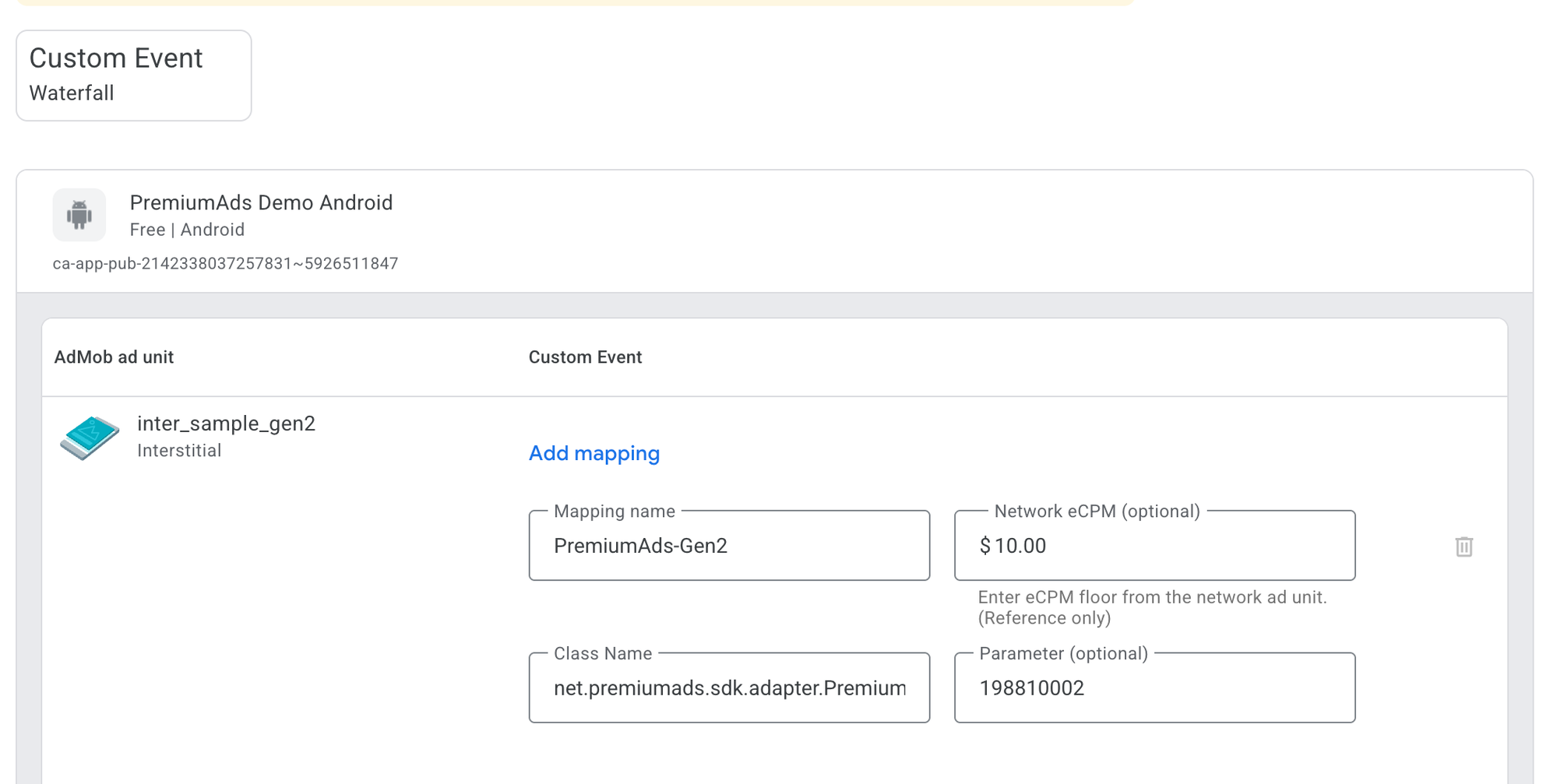
Fields:
| Field | Value |
|---|---|
| Mapping name | Any label that helps you identify the source (e.g. PremiumAds-Gen2) |
| Network eCPM | The eCPM floor from PremiumAds for this ad unit (reference only) |
| Class Name | net.premiumads.sdk.adapter.PremiumAdsAdapter |
| Parameter | Your PremiumAds ad unit ID (e.g. 198810002) |
All ad formats share the same PremiumAdsAdapter class name — the adapter auto-detects the format at runtime from the AdMob ad unit type.
3. Load Ads
Use standard Google Mobile Ads SDK APIs — no PremiumAds-specific code needed:
// Initialize
MobileAds.initialize(this) { }

// Banner
val adView = AdView(this)
adView.adUnitId = "ca-app-pub-xxxxx/xxxxx"
adView.setAdSize(AdSize.BANNER)
adView.loadAd(AdRequest.Builder().build())

// Interstitial
InterstitialAd.load(this, "ca-app-pub-xxxxx/xxxxx",
    AdRequest.Builder().build(),
    object : InterstitialAdLoadCallback() {
        override fun onAdLoaded(ad: InterstitialAd) {
            ad.show(this@MainActivity)
        }
    })

// Rewarded
RewardedAd.load(this, "ca-app-pub-xxxxx/xxxxx",
    AdRequest.Builder().build(),
    object : RewardedAdLoadCallback() {
        override fun onAdLoaded(ad: RewardedAd) {
            ad.show(this@MainActivity) { reward ->
                Log.d("Ads", "Earned: ${reward.amount} ${reward.type}")
            }
        }
    })

// Native
val adLoader = AdLoader.Builder(this, "ca-app-pub-xxxxx/xxxxx")
    .forNativeAd { ad -> /* display in NativeAdView */ }
    .build()
adLoader.loadAd(AdRequest.Builder().build())

// App Open
AppOpenAd.load(this, "ca-app-pub-xxxxx/xxxxx",
    AdRequest.Builder().build(),
    object : AppOpenAd.AppOpenAdLoadCallback() {
        override fun onAdLoaded(ad: AppOpenAd) {
            ad.show(this@MainActivity)
        }
    })
4. GDPR Compliance
The adapter automatically reads IAB TCF v2.0 consent from SharedPreferences. If you use Google's UMP SDK, no extra code is needed.
5. Debug Logging
PremiumAdsAdapter.setDebug(true)
Filter Logcat with tag PremiumAdsAdapter:
D/PremiumAdsAdapter: [Banner] Loading ad with unit: 6677029
D/PremiumAdsAdapter: [Banner] Ad loaded successfully
D/PremiumAdsAdapter: [Banner] Impression recorded
6. ProGuard
No additional ProGuard rules needed — the adapter includes its own consumer rules.
7. Verify
Use Ad Inspector to confirm the adapter is recognized and serving ads.
iOS
Prerequisites
- Google Mobile Ads SDK 11.0+ (supports up to v13)
- Xcode 15+, iOS 13.0+
CocoaPods (Preferred)
pod 'PremiumAdsGoogleAdapter'
Swift Package Manager
- File → Add Packages
- Enter:
https://github.com/premium-ads/adapter-ios-spm-v2 - Set Dependency Rule to "Up to Next Major Version" from
1.0.4
Configure AdMob Custom Event
| Field | Value |
|---|---|
| Class Name | PremiumAdsAdapter |
| Parameter | Your PremiumAds ad unit ID |
Load Ads
Use standard Google Mobile Ads SDK APIs:
import GoogleMobileAds

// Initialize
MobileAds.shared.start { status in }

// Banner
let bannerView = BannerView(adSize: AdSizeBanner)
bannerView.adUnitID = "ca-app-pub-xxxxx/xxxxx"
bannerView.rootViewController = self
bannerView.load(Request())

// Interstitial
InterstitialAd.load(with: "ca-app-pub-xxxxx/xxxxx", request: Request()) { ad, error in
    ad?.present(from: self)
}

// Rewarded
RewardedAd.load(with: "ca-app-pub-xxxxx/xxxxx", request: Request()) { ad, error in
    ad?.present(from: self) {
        let reward = ad?.adReward
        print("Earned: \(reward?.amount ?? 0) \(reward?.type ?? "")")
    }
}

// App Open
AppOpenAd.load(with: "ca-app-pub-xxxxx/xxxxx", request: Request()) { ad, error in
    ad?.present(from: self)
}
GDPR
The adapter reads IAB TCF v2.0 consent from UserDefaults automatically.
Debug Logging
PremiumAdsAdapter.setDebug(true)
Logs appear in Xcode console with [PremiumAdsAdapter] prefix.
Migration from SDK v1
| Old (v1) | New (v2) | |
|---|---|---|
| Android artifact | net.premiumads.sdk:admob-adapter:2.2.7 | net.premiumads.sdk:admob-adapter-v2:1.0.12 |
| Android class | net.premiumads.sdk.admob.PremiumBannerAd etc. | net.premiumads.sdk.adapter.PremiumAdsAdapter (all formats) |
| iOS pod | PremiumAdsAdapter | PremiumAdsGoogleAdapter |
| iOS class | GADMediationAdapterPremiumAds | PremiumAdsAdapter |
| Debug | PremiumAdSDK.setDebug(true) | PremiumAdsAdapter.setDebug(true) |
| GDPR | Manual npa bundle extras | Automatic (TCF v2.0) |
| ProGuard | Manual rules required | Built-in |
| minSdk | 19 | 21 |
Steps:
- Replace dependency in
build.gradle - Update AdMob Custom Event class name (single class for all formats)
- Remove old ProGuard rules for
net.premiumads.sdk.admob.** - Remove manual GDPR
npabundle code - Replace
PremiumAdSDK.setDebug(true)→PremiumAdsAdapter.setDebug(true)
Support
Contact your PremiumAds account manager or email [email protected]